Page 1 of 1
[VBA] สอบถามการ Upload File ขึ้นไปยัง ftp server
Posted: Mon Jul 03, 2017 1:31 pm
by kannaree
สวัสดีค่ะ อาจารย์และทุกท่าน ดิฉันอยากจะลอง Upload File เมื่อกดปุ่ม ใน Excel ไฟล์งานที่กำหนด
จะถูก Upload ไปยัง ftp ที่มีการตั้งค่าไว้ แต่ลองโค้ดแล้ว ไฟล์ไม่ถูก upload ขึ้นไป และไม่แสดง Error อยากทราบว่าจะต้องทำอย่างไรค่ะ
Code: Select all
'download File to FTP
Sub SendFileViaFTP_Click()

Dim strDirectoryList As String
Dim lStr_Dir As String
Dim lInt_FreeFile01 As Integer
Dim lInt_FreeFile02 As Integer

On Error GoTo Err_Handler
    lStr_Dir = ThisWorkbook.path
    lInt_FreeFile01 = FreeFile
    lInt_FreeFile02 = FreeFile

    '' ANW  07-Feb-2003 :
    strDirectoryList = lStr_Dir & "\Directory"

    '' Delete completion file
    If Dir(strDirectoryList & ".out") <> "" Then Kill (strDirectoryList & ".out")

    '' Create text file with FTP commands
    Open strDirectoryList & ".txt" For Output As #lInt_FreeFile01
    Print #lInt_FreeFile01, "ftp.svi.co.th"
    Print #lInt_FreeFile01, "100001"
    Print #lInt_FreeFile01, "9922"
    Print #lInt_FreeFile01, "cd source/uploads"
    Print #lInt_FreeFile01, "binary"
    Print #lInt_FreeFile01, "send " & ThisWorkbook.path & "\test.txt"

    '' To receive a file, replace the above line with this one
    ''Print #lInt_FreeFile01, "recv \Picture.gif " & ThisWorkbook.Path & "\Picture.gif"

    Print #lInt_FreeFile01, "bye"
    Close #lInt_FreeFile01

    '' Create Batch program
    Open strDirectoryList & ".bat" For Output As #lInt_FreeFile02
    Print #lInt_FreeFile02, "ftp -s:" & strDirectoryList & ".txt"

    Print #lInt_FreeFile02, "Echo ""Complete"" > " & strDirectoryList & ".out"
    Close #lInt_FreeFile02

    '' Invoke Directory List generator
    Shell (strDirectoryList & ".bat"), vbHide '', vbMinimizedNoFocus
    'Wait for completion
    Do While Dir(strDirectoryList & ".out") = ""
        DoEvents
    Loop

    Application.Wait (Now + TimeValue("0:00:03"))

    '' Clean up files
    If Dir(strDirectoryList & ".bat") <> "" Then Kill (strDirectoryList & ".bat")
    If Dir(strDirectoryList & ".out") <> "" Then Kill (strDirectoryList & ".out")
    If Dir(strDirectoryList & ".txt") <> "" Then Kill (strDirectoryList & ".txt")

bye:

Exit Sub

Err_Handler:
    MsgBox "Error : " & Err.Number & vbCrLf & "Description : " & Err.Description, vbCritical
    Resume bye


End Sub
ข้อมูลในไฟล์ Directory
ftp.svi.co.th
100001
9922
cd source/uploads
binary
send C:\Users\PUR_Kannaree\Desktop\test.txt
bye
ขอบคุณค่ะ
Re: [VBA] สอบถามการ Upload File ขึ้นไปยัง ftp server
Posted: Mon Jul 03, 2017 3:17 pm
by kannaree
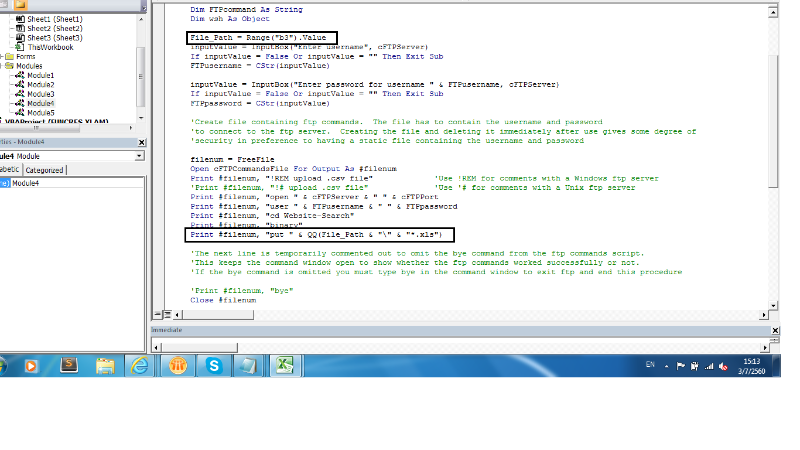
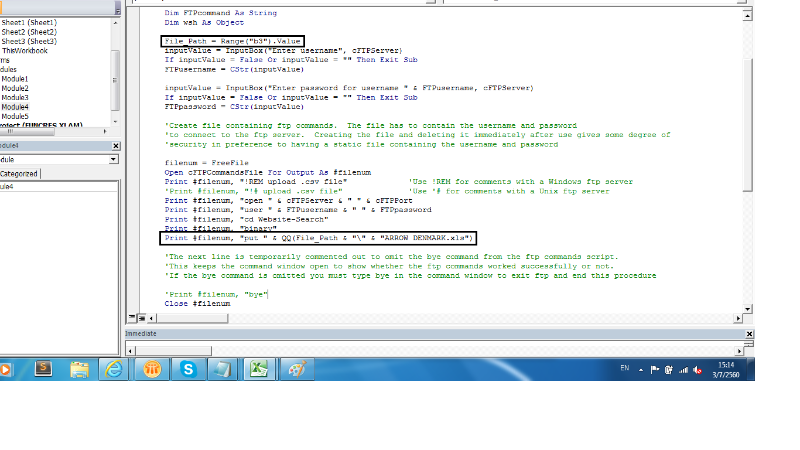
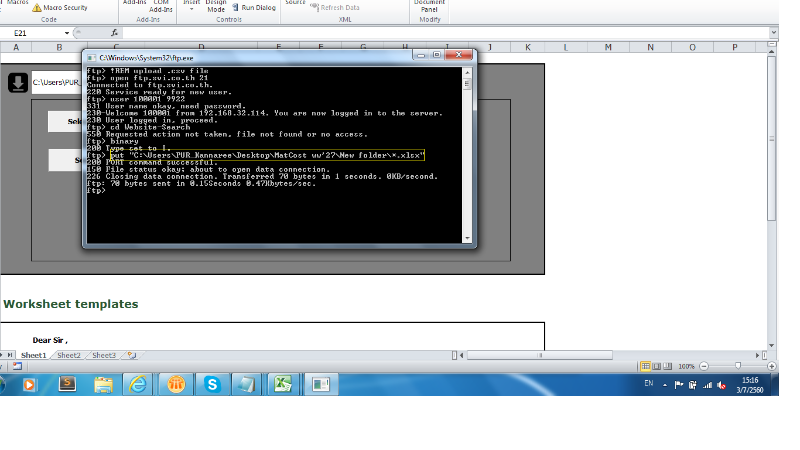
ทำได้แล้วค่ะ ในการ upload file to ftp สามารถ upload ไปได้ไฟล์งานเดียว
ติดปัญหาตรงที่ มีหลายไฟล์ในโฟรเดอร์ จะต้องแก้โค้ดในส่วนนี้อย่างไรค่ะ
Code: Select all
'download File to FTP
Const cFTPServer As String = "ftp.svi.co.th"     'CHANGE THIS.
Const cFTPPort = 21
Const cFTPCommandsFile As String = "FTP_commands.txt"

Sub SendFileViaFTP_Click()
    Dim inputValue As Variant
    Dim FTPusername As String, FTPpassword As String
    Dim filenum As Integer
    Dim FTPcommand As String
    Dim wsh As Object

    File_Path = Range("b3").Value
    inputValue = InputBox("Enter username", cFTPServer)
    If inputValue = False Or inputValue = "" Then Exit Sub
    FTPusername = CStr(inputValue)

    inputValue = InputBox("Enter password for username " & FTPusername, cFTPServer)
    If inputValue = False Or inputValue = "" Then Exit Sub
    FTPpassword = CStr(inputValue)

    'Create file containing ftp commands.  The file has to contain the username and password
    'to connect to the ftp server.  Creating the file and deleting it immediately after use gives some degree of
    'security in preference to having a static file containing the username and password

    filenum = FreeFile
    Open cFTPCommandsFile For Output As #filenum
    Print #filenum, "!REM upload .csv file"             'Use !REM for comments with a Windows ftp server
    'Print #filenum, "!# upload .csv file"              'Use '# for comments with a Unix ftp server
    Print #filenum, "open " & cFTPServer & " " & cFTPPort
    Print #filenum, "user " & FTPusername & " " & FTPpassword
    Print #filenum, "cd Website-Search"
    Print #filenum, "binary"
    Print #filenum, "put " & QQ(File_Path & "\" & "*.xlsx")

    'The next line is temporarily commented out to omit the bye command from the ftp commands script.
    'This keeps the command window open to show whether the ftp commands worked successfully or not.
    'If the bye command is omitted you must type bye in the command window to exit ftp and end this procedure

    'Print #filenum, "bye"
    Close #filenum

    'Construct ftp command line, specifying the file containing FTP commands.  The -n parameter suppresses auto-login
    'upon initial connection because we want to use the username and password specified in the command file

    FTPcommand = "ftp -i -n -s:" & QQ(cFTPCommandsFile)

    'Run ftp command synchronously, waiting for the command to return
    'WindowStyle 1 displays the command window. Use this, together with omitting the bye command, to verify
    'whether or not the ftp commands worked successfully.
    'WindowStyle 0 hides the command window.
    'See http://msdn.microsoft.com/en-us/library/d5fk67ky%28VS.85%29.aspx

    CreateObject("WScript.Shell").Run Command:=FTPcommand, WindowStyle:=1, waitonreturn:=True

    'Delete the ftp commands file so that the username and password are not left lying around

    Kill cFTPCommandsFile

    MsgBox "Finished"


End Sub
Private Function QQ(text As String) As String
    QQ = Chr(34) & text & Chr(34)
End Function
- 307_1.png (135.95 KiB) Viewed 432 times
- 307_2.png (131.85 KiB) Viewed 432 times
- 307_3.png (93.42 KiB) Viewed 432 times
Re: [VBA] สอบถามการ Upload File ขึ้นไปยัง ftp server
Posted: Mon Jul 03, 2017 8:18 pm
by snasui

แนบไฟล์โปรแกรมมาด้วยจะได้ช่วยทดสอบให้ได้ครับ
Re: [VBA] สอบถามการ Upload File ขึ้นไปยัง ftp server
Posted: Tue Jul 04, 2017 8:37 am
by kannaree
ขอบคุณค่ะอาจารย์
* กดปุ่ม (4) UploadFile to FTP
Module 4 : SendFileViaFTP_Click()
file ตัวอย่างที่ต้องการ upload
Re: [VBA] สอบถามการ Upload File ขึ้นไปยัง ftp server
Posted: Tue Jul 04, 2017 7:20 pm
by snasui
ลองใช้การ Loop ตามตัวอย่าง Code ด้านล่างเข้ามาช่วยว่า FTP ทุกไฟล์ได้หรือไม่ครับ
Code: Select all
Sub SendFileViaFTP_Click()
    Dim inputValue As Variant
    Dim FTPusername As String, FTPpassword As String
    Dim filenum As Integer
    Dim FTPcommand As String
    Dim wsh As Object
    Dim fileName As String

    file_path = Range("b3").Value
    inputValue = InputBox("Enter username", cFTPServer)
    If inputValue = False Or inputValue = "" Then Exit Sub
    FTPusername = CStr(inputValue)

    inputValue = InputBox("Enter password for username " & FTPusername, cFTPServer)
    If inputValue = False Or inputValue = "" Then Exit Sub
    FTPpassword = CStr(inputValue)

    'Create file containing ftp commands.  The file has to contain the username and password
    'to connect to the ftp server.  Creating the file and deleting it immediately after use gives some degree of
    'security in preference to having a static file containing the username and password

    fileName = Dir(file_path & "\*.xls")
    Do While Len(fileName) > 0
        filenum = FreeFile
        Open cFTPCommandsFile For Output As #filenum
        Print #filenum, "!REM upload .csv file"             'Use !REM for comments with a Windows ftp server
        'Print #filenum, "!# upload .csv file"              'Use '# for comments with a Unix ftp server
        Print #filenum, "open " & cFTPServer & " " & cFTPPort
        Print #filenum, "user " & FTPusername & " " & FTPpassword
        Print #filenum, "cd Website-Search"
        Print #filenum, "binary"
        Print #filenum, "put " & QQ(file_path & "\" & fileName)


        'The next line is temporarily commented out to omit the bye command from the ftp commands script.
        'This keeps the command window open to show whether the ftp commands worked successfully or not.
        'If the bye command is omitted you must type bye in the command window to exit ftp and end this procedure

        'Print #filenum, "bye"
        Close #filenum

        'Construct ftp command line, specifying the file containing FTP commands.  The -n parameter suppresses auto-login
        'upon initial connection because we want to use the username and password specified in the command file

        FTPcommand = "ftp -i -n -s:" & QQ(cFTPCommandsFile)

        'Run ftp command synchronously, waiting for the command to return
        'WindowStyle 1 displays the command window. Use this, together with omitting the bye command, to verify
        'whether or not the ftp commands worked successfully.
        'WindowStyle 0 hides the command window.
        'See http://msdn.microsoft.com/en-us/library/d5fk67ky%28VS.85%29.aspx

        CreateObject("WScript.Shell").Run Command:=FTPcommand, WindowStyle:=1, waitonreturn:=True

        'Delete the ftp commands file so that the username and password are not left lying around

        Kill cFTPCommandsFile

        fileName = Dir
    Loop

    MsgBox "Finished"
Re: [VBA] สอบถามการ Upload File ขึ้นไปยัง ftp server
Posted: Wed Jul 05, 2017 11:19 am
by kannaree
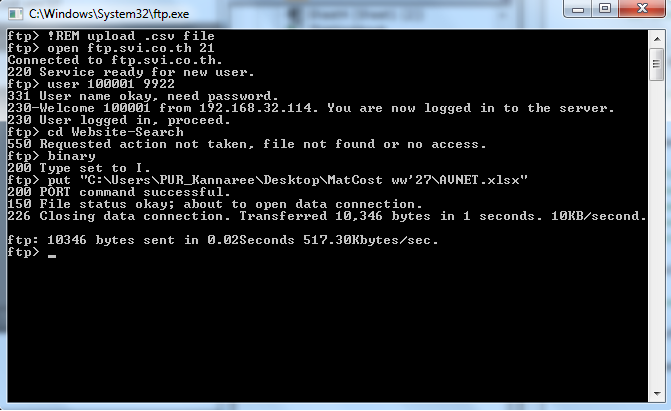
ตามที่ได้แก้ไขโค้ดตามอาจารย์ ไม่ได้คะ upload ไปแค่ไฟล์เดียว
Code: Select all
Sub Sendmail()

    Dim inputValue As Variant
    Dim FTPusername As String, FTPpassword As String
    Dim filenum As Integer
    Dim FTPcommand As String
    Dim wsh As Object
    Dim fileName As String

    file_path = Range("b3").Value
    inputValue = InputBox("Enter username", cFTPServer)
    If inputValue = False Or inputValue = "" Then Exit Sub
    FTPusername = CStr(inputValue)

    inputValue = InputBox("Enter password for username " & FTPusername, cFTPServer)
    If inputValue = False Or inputValue = "" Then Exit Sub
    FTPpassword = CStr(inputValue)

    'Create file containing ftp commands.  The file has to contain the username and password
    'to connect to the ftp server.  Creating the file and deleting it immediately after use gives some degree of
    'security in preference to having a static file containing the username and password

    fileName = Dir(file_path & "\*.xls")
    Do While Len(fileName) > 0
        filenum = FreeFile
        Open cFTPCommandsFile For Output As #filenum
        Print #filenum, "!REM upload .csv file"             'Use !REM for comments with a Windows ftp server
        'Print #filenum, "!# upload .csv file"              'Use '# for comments with a Unix ftp server
        Print #filenum, "open " & cFTPServer & " " & cFTPPort
        Print #filenum, "user " & FTPusername & " " & FTPpassword
        Print #filenum, "cd Website-Search"
        Print #filenum, "binary"
        Print #filenum, "put " & QQ(file_path & "\" & fileName)


        'The next line is temporarily commented out to omit the bye command from the ftp commands script.
        'This keeps the command window open to show whether the ftp commands worked successfully or not.
        'If the bye command is omitted you must type bye in the command window to exit ftp and end this procedure

        'Print #filenum, "bye"
        Close #filenum

        'Construct ftp command line, specifying the file containing FTP commands.  The -n parameter suppresses auto-login
        'upon initial connection because we want to use the username and password specified in the command file

        FTPcommand = "ftp -i -n -s:" & QQ(cFTPCommandsFile)

        'Run ftp command synchronously, waiting for the command to return
        'WindowStyle 1 displays the command window. Use this, together with omitting the bye command, to verify
        'whether or not the ftp commands worked successfully.
        'WindowStyle 0 hides the command window.
        'See http://msdn.microsoft.com/en-us/library/d5fk67ky%28VS.85%29.aspx

        CreateObject("WScript.Shell").Run Command:=FTPcommand, WindowStyle:=1, waitonreturn:=True

        'Delete the ftp commands file so that the username and password are not left lying around

        Kill cFTPCommandsFile

        fileName = Dir
    Loop

    MsgBox "Finished"


End Sub
- 4455.png (54.91 KiB) Viewed 413 times
Re: [VBA] สอบถามการ Upload File ขึ้นไปยัง ftp server
Posted: Wed Jul 05, 2017 6:22 pm
by kannaree
ขอสอบถามอาจารย์นอกเรื่องหน่อยค่ะ
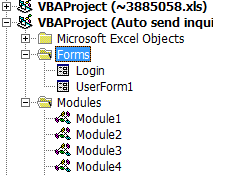
ฟังก์ชั่นการทำงานในลักษณะนี้ ที่มีเครื่องหมายการเป็นข้อมูล บวก ลบ แตกเป็น subset แบบรูปด้านล่าง
เรียกว่าอะไรหรอคะ ? พยายามจะหา keyword แต่ก็ไม่พบ และ vba สามารถเก็บข้อมูลในลักษณะนี้ได้หรือไม่คะ
- what.png (5.48 KiB) Viewed 405 times
ขอบคุณค่ะ
Re: [VBA] สอบถามการ Upload File ขึ้นไปยัง ftp server
Posted: Mon Jul 10, 2017 8:35 pm
by snasui
กรณี Upload ได้แค่ไฟล์เดียวผมยังไม่มี Idea เพิ่มเติม เนื่องจากไม่มี Environment ให้ทดสอบครับ
สำหรับภาพการแสดง Folder ใน VBA ไม่มี Control ลักษณะนั้นจะมีก็แต่ใน .Net เรียกว่า TreeView ครับ
