#1
by kannaree » Fri Aug 11, 2017 2:06 pm
สวัสดีคะอาจารย์และทุกๆท่าน
ฉันอยากจะทราบว่าเราสามารถ vlookup จากชื่อไฟล์ในโฟลเดอร์ได้หรือไม่ อย่างไรคะ
คือต้องการให้คลิกปุ่ม auto send mail
แล้วให้ vlookup หา file จาก folder ที่เก็บไว้ ถ้าชื่อไฟล์เหมือน column ให้ส่งเมล์ ตาม column [D]
ไม่ทราบว่า สามารถวนลูปได้ในลักษณะไหนคะ พอดีตอนนี้ fixไว้
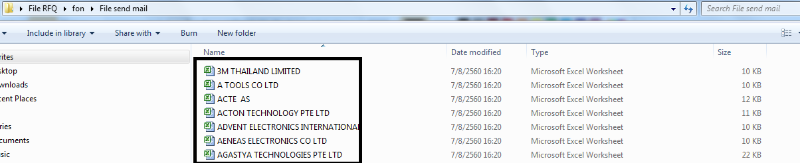
folder :
[attachment=2]1.png[/attachment]
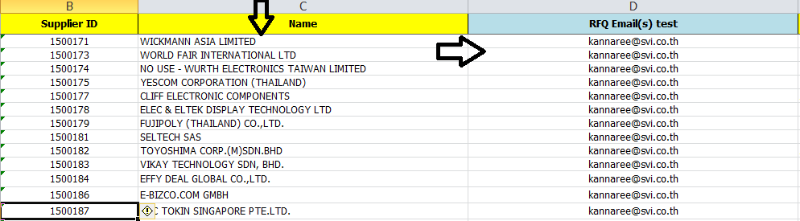
vlookup จาก sheets database
[attachment=1]2.png[/attachment]
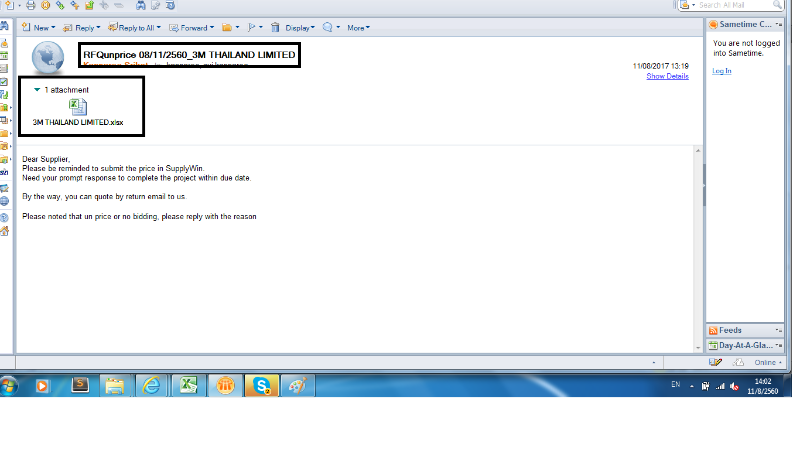
send e-mail พร้อมแนบไฟล์
[attachment=0]3.png[/attachment]
Code :
[code]'------------------ Send auto e-mail to supplier ---------------------
Private Sub CommandButton5_Click()
Dim noSession As Object, noDatabase As Object, noDocument As Object
Dim obAttachment As Object, EmbedObject As Object
Dim stSubject As Variant, stAttachment As String, stsupplier As String
Dim vaRecipient As Variant, vaMsg As Variant
Const EMBED_ATTACHMENT As Long = 1454
Const stTitle As String = "Status Active workbook"
Const stMsg As String = "The active workbook must first be saved " & vbCrLf _
& "before it can be sent as an attachment."
'Check if the active workbook is saved or not
'If the active workbook has not been saved at all.
If Len(ActiveWorkbook.Path) = 0 Then
MsgBox stMsg, vbInformation, stTitle
Exit Sub
End If
'If the changes in the active workbook has been saved or not.
If ActiveWorkbook.Saved = False Then
If MsgBox("Do you want to save the changes before sending?", _
vbYesNo + vbInformation, stTitle) = vbYes Then _
ActiveWorkbook.Save
End If
'Get the name of the recipient from the user.
'++++++++++++====== send e-mail To ===============================++++++++++++
'Do
' vaRecipient = Application.InputBox(_
' prompt:="Please add the name of the recipient such as:" & vbCrLf_
' & "excel@microsoft.com or just the name if it's internally.",_
' Title:="Recipient", Type:=2)
' Loop While vaRecipient = ""
vaRecipient = "kannaree@svi.co.th" & "," & "svi.kannaree@gmail.com"
'++++++++++++=========================================================++++++++++++
'If the user has canceled the operation.
If vaRecipient = False Then Exit Sub
'Get the message from the user.
'===== Message Body popup (old) ============================
'Do
' vaMsg = Application.InputBox( _
' Prompt:="Please enter the message such as:" & vbCrLf _
' & "Enclosed please find the weekly report.", _
' Title:="Message", Type:=2)
'Loop While vaMsg = ""
vaMsg = "Dear Supplier," & vbNewLine _
& "Please be reminded to submit the price in SupplyWin." & vbNewLine & "Need your prompt response to complete the project within due date." & vbNewLine _
& "" & vbNewLine & "By the way, you can quote by return email to us." & "" & vbNewLine & vbNewLine & "Please noted that un price or no bidding, please reply with the reason"
'++++++++++++=========================================================++++++++++++
'If the user has canceled the operation.
If vaMsg = False Then Exit Sub
'Add the subject to the outgoing e-mail which also can be retrieved from the users
'in a similar way as above.
stSubject = "RFQunprice"
stsupplier = "3M THAILAND LIMITED"
'Retrieve the path and filename of the active workbook.
'stAttachment = ActiveWorkbook.FullName
stAttachment = "C:\Users\PUR_Kannaree\Desktop\File RFQ\fon\File send mail\3M THAILAND LIMITED.xlsx"
'Instantiate the Lotus Notes COM's Objects.
Set noSession = CreateObject("Notes.NotesSession")
Set noDatabase = noSession.GETDATABASE("", "")
'If Lotus Notes is not open then open the mail-part of it.
If noDatabase.IsOpen = False Then noDatabase.OPENMAIL
'Create the e-mail and the attachment.
Set noDocument = noDatabase.CreateDocument
Set obAttachment = noDocument.CreateRichTextItem("stAttachment")
Set EmbedObject = obAttachment.EmbedObject(EMBED_ATTACHMENT, "", stAttachment)
'Add values to the created e-mail main properties.
With noDocument
.Form = "Memo"
.SendTo = vaRecipient
.Subject = stSubject & Format(Date, " mm/dd/yyyy") & "_" & stsupplier
.Body = vaMsg
.SaveMessageOnSend = True
End With
'Send the e-mail.
With noDocument
.PostedDate = Now()
.Send 0, vaRecipient
End With
'Release objects from the memory.
Set EmbedObject = Nothing
Set obAttachment = Nothing
Set noDocument = Nothing
Set noDatabase = Nothing
Set noSession = Nothing
'Activate Excel for the user.
AppActivate "Microsoft Excel"
MsgBox "The e-mail has successfully been created and distributed.", vbInformation
End Sub
[/code]
ขอบคุณค่ะ
- Attachments
-
- 1.png (55.74 KiB) Viewed 1866 times
-
- 2.png (78.83 KiB) Viewed 1866 times
-
- 3.png (84.07 KiB) Viewed 1866 times
สวัสดีคะอาจารย์และทุกๆท่าน
ฉันอยากจะทราบว่าเราสามารถ vlookup จากชื่อไฟล์ในโฟลเดอร์ได้หรือไม่ อย่างไรคะ
คือต้องการให้คลิกปุ่ม auto send mail
แล้วให้ vlookup หา file จาก folder ที่เก็บไว้ ถ้าชื่อไฟล์เหมือน column[C] ให้ส่งเมล์ ตาม column [D]
ไม่ทราบว่า สามารถวนลูปได้ในลักษณะไหนคะ พอดีตอนนี้ fixไว้
folder :
[attachment=2]1.png[/attachment]
vlookup จาก sheets database
[attachment=1]2.png[/attachment]
send e-mail พร้อมแนบไฟล์
[attachment=0]3.png[/attachment]
Code :
[code]'------------------ Send auto e-mail to supplier ---------------------
Private Sub CommandButton5_Click()
Dim noSession As Object, noDatabase As Object, noDocument As Object
Dim obAttachment As Object, EmbedObject As Object
Dim stSubject As Variant, stAttachment As String, stsupplier As String
Dim vaRecipient As Variant, vaMsg As Variant
Const EMBED_ATTACHMENT As Long = 1454
Const stTitle As String = "Status Active workbook"
Const stMsg As String = "The active workbook must first be saved " & vbCrLf _
& "before it can be sent as an attachment."
'Check if the active workbook is saved or not
'If the active workbook has not been saved at all.
If Len(ActiveWorkbook.Path) = 0 Then
MsgBox stMsg, vbInformation, stTitle
Exit Sub
End If
'If the changes in the active workbook has been saved or not.
If ActiveWorkbook.Saved = False Then
If MsgBox("Do you want to save the changes before sending?", _
vbYesNo + vbInformation, stTitle) = vbYes Then _
ActiveWorkbook.Save
End If
'Get the name of the recipient from the user.
'++++++++++++====== send e-mail To ===============================++++++++++++
'Do
' vaRecipient = Application.InputBox(_
' prompt:="Please add the name of the recipient such as:" & vbCrLf_
' & "excel@microsoft.com or just the name if it's internally.",_
' Title:="Recipient", Type:=2)
' Loop While vaRecipient = ""
vaRecipient = "kannaree@svi.co.th" & "," & "svi.kannaree@gmail.com"
'++++++++++++=========================================================++++++++++++
'If the user has canceled the operation.
If vaRecipient = False Then Exit Sub
'Get the message from the user.
'===== Message Body popup (old) ============================
'Do
' vaMsg = Application.InputBox( _
' Prompt:="Please enter the message such as:" & vbCrLf _
' & "Enclosed please find the weekly report.", _
' Title:="Message", Type:=2)
'Loop While vaMsg = ""
vaMsg = "Dear Supplier," & vbNewLine _
& "Please be reminded to submit the price in SupplyWin." & vbNewLine & "Need your prompt response to complete the project within due date." & vbNewLine _
& "" & vbNewLine & "By the way, you can quote by return email to us." & "" & vbNewLine & vbNewLine & "Please noted that un price or no bidding, please reply with the reason"
'++++++++++++=========================================================++++++++++++
'If the user has canceled the operation.
If vaMsg = False Then Exit Sub
'Add the subject to the outgoing e-mail which also can be retrieved from the users
'in a similar way as above.
stSubject = "RFQunprice"
stsupplier = "3M THAILAND LIMITED"
'Retrieve the path and filename of the active workbook.
'stAttachment = ActiveWorkbook.FullName
stAttachment = "C:\Users\PUR_Kannaree\Desktop\File RFQ\fon\File send mail\3M THAILAND LIMITED.xlsx"
'Instantiate the Lotus Notes COM's Objects.
Set noSession = CreateObject("Notes.NotesSession")
Set noDatabase = noSession.GETDATABASE("", "")
'If Lotus Notes is not open then open the mail-part of it.
If noDatabase.IsOpen = False Then noDatabase.OPENMAIL
'Create the e-mail and the attachment.
Set noDocument = noDatabase.CreateDocument
Set obAttachment = noDocument.CreateRichTextItem("stAttachment")
Set EmbedObject = obAttachment.EmbedObject(EMBED_ATTACHMENT, "", stAttachment)
'Add values to the created e-mail main properties.
With noDocument
.Form = "Memo"
.SendTo = vaRecipient
.Subject = stSubject & Format(Date, " mm/dd/yyyy") & "_" & stsupplier
.Body = vaMsg
.SaveMessageOnSend = True
End With
'Send the e-mail.
With noDocument
.PostedDate = Now()
.Send 0, vaRecipient
End With
'Release objects from the memory.
Set EmbedObject = Nothing
Set obAttachment = Nothing
Set noDocument = Nothing
Set noDatabase = Nothing
Set noSession = Nothing
'Activate Excel for the user.
AppActivate "Microsoft Excel"
MsgBox "The e-mail has successfully been created and distributed.", vbInformation
End Sub
[/code]
ขอบคุณค่ะ
 snasui.com ยินดีต้อนรับ
  สมาชิกท่านใดที่ยังไม่ได้ระบุ Version ของ Excel ที่ใช้งานจริง สามารถทำตาม Link นี้เพื่อจะได้รับคำตอบที่ตรงกับ Version ของท่านครับ
  ระบุ Version ของ Excel
  โปรดทราบ